

A vape that seems unresponsive may still be charging: a fully drained battery can take a while to show an indicator light. Charging time varies by device, so follow its manual. If you’re wondering why your vape won’t charge, first check that it’s receiving power and showing the expected charging status.
It’s frustrating to plug in your vape and see no light or change. Before assuming the battery has failed, check the power source, cable and charging port, then give a flat battery time to respond.
This guide takes you through the checks in order, explains what charging indicators can mean and shows when to stop for safety. You’ll also learn how to distinguish a charger problem from a fault with the vape itself.
Key Takeaways
- A deeply drained vape may need fifteen to thirty minutes on charge before its indicator appears.
- Check the cable, plug and power source, then inspect the charging port for debris.
- Learn what your device’s indicator lights mean so you can tell whether it is charging or signalling a fault.
- Compare the charger and vape separately to narrow down where the problem lies.
- Know when to stop charging and when a worn or damaged battery may need replacing.
How long should a vape take to charge?
- Record how long your own device takes. Start with a low battery, connect it as directed, and note when charging finishes. Repeat the observation on a later charge. This gives you a useful baseline for that specific vape, unlike comparing its performance with a different model. If the time changes noticeably, consider whether the battery or charging setup has changed.
- Use a displayed battery level as a trend. If your vape has a screen showing battery percentage, note the reading when you connect it and check whether it rises. A single reading can be hard to interpret, but a clear increase shows progress. If the percentage stays unchanged across checks, record that alongside the cable and power supply used.
- Compare like with like. A vape’s charging time depends on its battery capacity and charging circuit, so two devices can take different lengths of time. Some vape charging circuits limit current to around 0.5 to 1 A. Don’t treat another model’s charging duration as the standard for yours, even if both use a similar-looking USB connection.
- Consider the battery’s age and use. Most rechargeable vape batteries last 300-500 charge cycles, though that figure doesn’t predict exactly when an individual battery will wear out. Keep a simple note of repeated charging problems and reduced running time. If you’re trying to work out why your vape won’t charge as it used to, its charging history can help distinguish a gradual change from a sudden fault.
- Check the right method for removable cells. For a vape mod using removable 18650 batteries, use a dedicated battery charger rather than the device’s USB port. Reinsert each cell securely if charging it separately, and follow the instructions for that charger and battery. This method applies to removable-cell mods, not vapes with built-in batteries.
- Use the pattern to guide your next step. Compare your notes with the vape’s normal charging behaviour, not a general estimate. A changing battery level or consistent completion time gives you a clearer reference point. If you’re still asking why your vape won’t charge despite its usual setup, keep the model details and charging observations together before seeking help.
Checking the cable, plug, power source and charging port
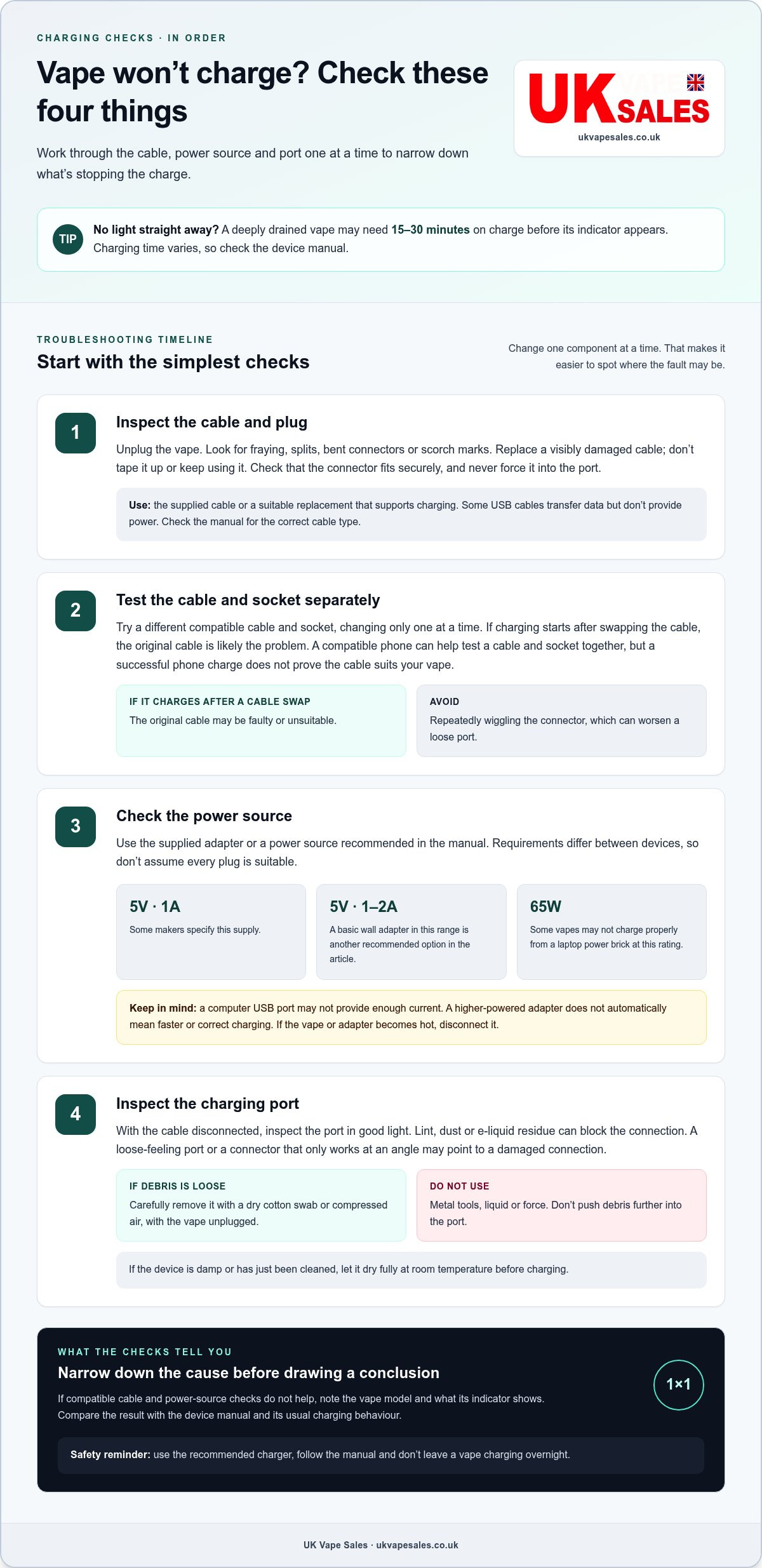
Common causes include a damaged or incompatible cable, a faulty socket, an unsuitable power source or debris in the charging port. Use the supplied or recommended charger, and don’t leave a vape charging overnight. Follow the manual’s safety instructions.
-
Inspect the charging cable and plug
Unplug the vape and inspect the cable from end to end for fraying, splits, bent connectors or scorch marks. Replace a visibly damaged cable rather than taping it or continuing to use it. Check that the plug fits securely into the vape’s charging port; a loose connection can interrupt charging.
Use the supplied cable or a suitable replacement that supports charging. Some USB cables transfer data but don’t provide power. Never force a connector into the port, even if it looks almost compatible. Check the vape manual for the required cable type.
-
Test the cable and power socket
Try a different compatible cable and socket, changing one component at a time. If the vape starts charging after you change the cable, the original cable is likely the problem. To test the socket and cable together, briefly connect a compatible phone. If it also fails to charge, try another socket and cable.
A phone charging successfully doesn’t prove the cable is suitable for your vape. Some cables transfer data without supplying power, and devices can have different charging requirements. Check the vape manual before using a phone charger or cable as a test. Avoid repeatedly wiggling the connector, which can worsen a loose port.
-
Check the power source
Use the supplied adapter or a power source recommended in the manual. Some vape makers specify a 5V, 1A supply; a basic 5V wall adapter rated at 1 to 2 amps is another recommended option. Requirements vary, so follow your device’s instructions instead of assuming every plug is suitable.
A computer USB port may not provide enough current for your vape. Try a suitable wall plug instead. Some vapes may not charge properly from a 65W laptop power brick, so avoid assuming a higher-powered adapter will charge faster or work correctly. If the device or adapter becomes hot, disconnect it.
-
Inspect the charging port
Disconnect the cable and inspect the charging port in good light. Lint, dust or e-liquid residue can block the connection. With the vape unplugged, carefully remove loose debris using a dry cotton swab or compressed air. Don’t use metal tools, liquid or force, as these could damage the port.
Check whether the port feels loose or the connector only works at an angle. This can indicate a damaged connection rather than a power-source problem. Let a damp or recently cleaned device dry fully at room temperature before charging. If debris is out of reach, don’t push it further into the port.
Checking whether the charger or vape is faulty
Change one component at a time to distinguish a charger problem from a device fault. Compare the result with the vape’s usual charging behaviour and instructions.
-
Run the first-line charging checks
Start with a charger and cable known to be compatible with the vape. Connect them and note whether the device shows its usual charging symbol or indicator. Avoid changing the cable, adapter and vape position at once, or you won’t know which change affected the result.
If the setup has worked before, compare the current response with what you saw previously. A different indicator pattern or no response can help narrow down the fault, but check the device manual to interpret the signals. Note the model and what appears on its screen or light.
-
Inspect the USB socket for debris
With the vape unplugged, inspect its USB socket for visible damage or a connector that sits loosely. If the port is clear, there’s no need to clean it again. Check instead whether the cable stays secure without being held at an angle.
A loose or visibly damaged socket suggests a device-side problem. Don’t bend the connector or keep repositioning it to maintain power. That can make the connection less reliable and won’t confirm whether the charger is working properly.
-
Compare the charger with a compatible device.
Use the same charger and cable with another vape that supports that charging setup. If the second device responds normally, the charger is less likely to be the cause, pointing instead to the original vape. If both devices fail to respond, suspect the shared charging equipment.
This comparison is useful only if the second vape is compatible with that charger. Devices can have different charging requirements, so a mismatch makes the result inconclusive. Follow each device’s instructions and don’t use a charger that either manufacturer advises against.
-
Check the pod and cartridge separately.
Remove the pod or cartridge and test charging without it, if the manual permits this. This can help distinguish an issue with the removable component from a fault in the vape body. Refit the pod only as the instructions direct.
Look for visible damage or liquid around the pod connection. Don’t use a leaking or damaged component. If the vape behaves differently with the pod removed, include that detail when following the manufacturer’s troubleshooting instructions.
-
Use the results to identify the likely fault.
If compatible charging equipment works with another vape but not yours, the original device may be faulty. If the same equipment also fails with another compatible device, investigate or replace the charging accessory rather than assuming the vape is broken.
Stop testing if the vape gets hot, leaks or smells unusual. Don’t open its casing or attempt an internal repair. Note which devices and accessories you tested, then follow the manufacturer’s support or warranty process for the likely faulty component.
Confirming whether the device is charging
Check the vape’s own status display to confirm charging progress, rather than relying only on whether it powers on. Follow the manufacturer’s instructions to identify what a full charge looks like for your model.
- Note the starting status. Before connecting the vape, check its screen or battery indicator and note what it shows. If it displays a percentage, record it. If it uses lights, observe their pattern without assuming what they mean. The manual explains which signal indicates charging and which means the battery is full.
- Look for a change over time. After connecting the vape, compare its display with your starting note. A rising battery percentage directly indicates progress on devices that show a readable level. If there’s no percentage, check whether the charging symbol or light changes as described in the instructions.
- Check the completion signal. Follow the manufacturer’s description of a full battery, such as a changed display or an indicator switching off. Don’t assume every device uses the same signal. Once the vape shows its stated completion status, disconnect it rather than leaving it plugged in unnecessarily.
- Separate charging from switching on. A vape that responds to its button has power, but that alone doesn’t prove its battery has charged. Use the model’s normal start-up method, then check the battery display again. A faulty button or indicator can make the status harder to read, so compare the response with the manual.
- Observe what happens after unplugging. Disconnect the vape when its instructions indicate charging is complete. Check whether the battery status remains consistent and the device works as expected. A sudden drop in the displayed level or loss of power can point to a battery or device fault, not a completed charge.
- Record the result before deciding what to do. Note the model, charging signal, displayed level before and after, and whether the vape worked when unplugged. These details can help if you need manufacturer support. If your rechargeable device shows no clear status or its display appears broken, don’t guess; follow the manual’s fault guidance.
UK Vape Sales: IVG Pro 12 Refill Pods
UK Vape Sales offers IVG Pro 12 Refill Pods for users whose compatible device charges correctly but needs a replacement pod. A refill pod won’t fix a faulty battery, charging port or cable, so finish the charging checks before choosing one.
If the vape itself has failed, a refill pod alone won’t replace the device. UK Vape Sales also offers IVG Kits, alongside IVG Smart Max Refill Pods and premium nic salts. Choose according to what needs replacing: the device, a compatible pod or e-liquid for a refillable setup.
Visit UK Vape Sales to browse the available IVG options.
Choose the right next step for your device
If you’re still wondering why your vape won’t charge after checking its power setup, treat the charging fault separately from a pod or e-liquid replacement. A refill pod won’t repair a damaged battery or charging port. If the device itself has failed, a compatible replacement kit may be more suitable.
UK Vape Sales offers Lost Mary BM6000 Refill Pods and Lost Mary BM6000 Kits, as well as IVG Pro 12 Refill Pods. Choose a pod only when you have the matching device and need a refill; choose a kit if you need a device replacement. These options suit different needs, and neither should be treated as a fix for a charging fault.
For help choosing between a compatible refill and a replacement kit, contact UK Vape Sales. Take the next step that matches what your device needs, and you can move forward with more confidence.
Frequently Asked Questions
Is a vape with a charging port disposable?
A charging port alone doesn’t tell you whether a vape is reusable or single-use; check its packaging and product instructions. Check the packaging and product instructions to confirm whether a vape is single-use or reusable, and follow current local guidance before using it. A reusable device is designed for continued use with compatible replacement pods or refills. If you’re unsure which type you have, identify its model before buying any replacement parts.
When should I get a professional to check my vape?
Stop using the device and seek qualified help if it’s swollen, leaking, unusually hot, smells strange or has a damaged battery. Don’t open the casing or try to repair the charging circuit yourself. If there’s no visible damage but the vape still fails after basic checks, follow the manufacturer’s support or warranty instructions. Keep the model name and a description of the fault handy.
How do I know if my vape battery is dead?
A battery may be worn out if the device repeatedly fails to power on after charging or runs for only minutes before switching off. First rule out a faulty indicator or button by checking the manual’s normal start-up method. A battery that charges quickly but loses power almost immediately is another warning sign. Stop using it if you notice swelling, leakage or unusual heat.
Can extreme temperatures affect charging?
Yes. A vape exposed to strong heat or cold may not charge or perform normally. If it has been in a cold car or direct sun, bring it indoors and let it adjust for a few minutes before charging. Keep it away from heaters and direct sunlight. If the device feels hot, unplug it and allow it to cool for 10 minutes before trying again.
How can I troubleshoot a vape that won’t charge step by step?
Start with the device manual, then inspect the vape and accessories for visible damage. Test a compatible cable and power source, changing one part at a time to identify what affects the result. Check the port for obstruction, reconnect the vape and observe the indicator. Note the model, cable and power source used, plus any light pattern. Stop if the vape gets hot or leaks.
How do I clean a vape charging port safely?
Switch off the vape, unplug it and inspect the port in good light. Gently remove loose lint or dust with a dry cotton swab. Don’t insert metal objects, add liquid or force anything into the opening, and avoid pushing debris further inside. If residue is stuck or the port looks bent or loose, stop cleaning to avoid damage. Keep the device unplugged until the port is dry.