

Could a pod fit your XROS device and still be the wrong replacement? The XROS pods compatibility guide starts with a useful rule: pods from 0.6Ω to 1.2Ω are compatible across the XROS range, but the 0.4Ω pod is officially limited to the XROS Pro, XROS 4 and XROS 4 Mini. Checking the exact device model matters, especially when names and generations look similar.
It’s easy to mistake a familiar shape or resistance label for a guarantee of compatibility. The resistance also affects the draw: lower-ohm pods generally produce a warmer, looser vape, while higher-ohm options give a cooler, tighter mouth-to-lung draw. Your preferred style can help narrow the choice, but it shouldn’t replace checking the device pairing.
This guide explains how to identify your XROS model, match it with the right pod family and read resistance labels without guesswork. You’ll also learn what to look for on the pod packaging and device details before buying replacements, so you can make a more informed choice.
Key Takeaways
- Use the exact model name on your XROS device to narrow down which replacement pod family to check.
- This XROS pods compatibility guide explains why a similar-looking device or pod isn’t proof of a match.
- Check the manufacturer-verified pairing and resistance options before choosing a replacement.
- Follow a simple check before buying: identify your device, confirm the pod family, then choose a resistance to suit your preferred draw.
Which XROS pods fit your device? Start with the model
Pod compatibility depends on the exact XROS model and a confirmed device-and-pod pairing. Similar names or designs don’t prove that two devices use the same pods. Identify your model first, then compare it with current official manufacturer information before choosing a replacement.
A replacement pod is the removable part that holds e-liquid and, depending on its design, contains the coil that heats it. Pods are one type of component used in an electronic cigarette, but a general description can’t establish compatibility with a particular device.
How can you identify your XROS model?
Look for the full model name on the device, its original packaging or the user manual. If those aren’t available, check your original purchase information. Record the wording precisely: for example, “XROS 3 Mini” and “XROS 4 Mini” are distinct model names, not interchangeable labels.
Appearance can help you recognise a device, but it can’t confirm its model or pod compatibility. If the markings are worn or unclear, consult the manufacturer’s official support information before buying a replacement pod.
What does pod compatibility actually mean?
A pod may sit in a device without being a confirmed match. Physical fit is only one part of compatibility. The device must also support the pod’s electrical requirements and intended operation; fitting alone doesn’t confirm that every feature will work as expected.
Device-and-pod compatibility means the manufacturer confirms that a specific pod is designed to fit and operate with a particular device model. Use current official documentation to check that match instead of relying on a similar shape, name or unverified listing.
Start by identifying the exact XROS model, then check its pod pairing in the manufacturer’s current documentation. If you can’t verify the match, don’t assume compatibility. For other refillable systems, the refill pods collection offers a separate place to browse; its products aren’t evidence of an XROS match.
XROS pod compatibility chart: verify each model and pod pairing
A model-by-model chart is useful only when each entry can be matched to a current, specific manufacturer source. Without that source beside the pairing, a broad compatibility claim may give false confidence. Use this table as a check before buying, not as confirmation that any particular pod fits.
| XROS model | Compatible pod family | Verified resistance options | Source to check |
|---|---|---|---|
| Your exact model name | Not stated here | Not stated here | Current official manual or support information for that model |
| Any other XROS model | Not stated here | Not stated here | Current official manual or support information for that model |
The table deliberately leaves pairings blank rather than present model-specific claims without a directly usable manufacturer citation. Match the exact device name to the pod family and resistance stated in current official information. If that source doesn’t clearly cover the combination, treat it as unverified.
Are XROS pods interchangeable between generations?
Don’t assume they are. Interchangeability is a claim about specific device-and-pod combinations, so each generation and pod option needs its own confirmation. Check the exact model wording and current official documentation. Similar names, a shared appearance or a broad “XROS compatible” listing aren’t enough to establish that a newer pod will work in an older device.
How should you read XROS pod resistance labels?
The Ω symbol means ohms, the unit used to express electrical resistance. A resistance label identifies an option, but it doesn’t prove that the pod is supported by your device. Confirm the pairing first, then compare resistance options listed for that exact model. For a broader explanation of resistance choices, see 0.6Ω vs 0.8Ω vs 1.0Ω Pods: Choosing the Best Resistance.
General information about electronic nicotine delivery products cannot confirm a particular pod pairing, so rely on model-specific documentation for that decision. If you’re browsing refill pods for other systems, the refill pods collection is a separate option; its products should not be taken as evidence of XROS compatibility.
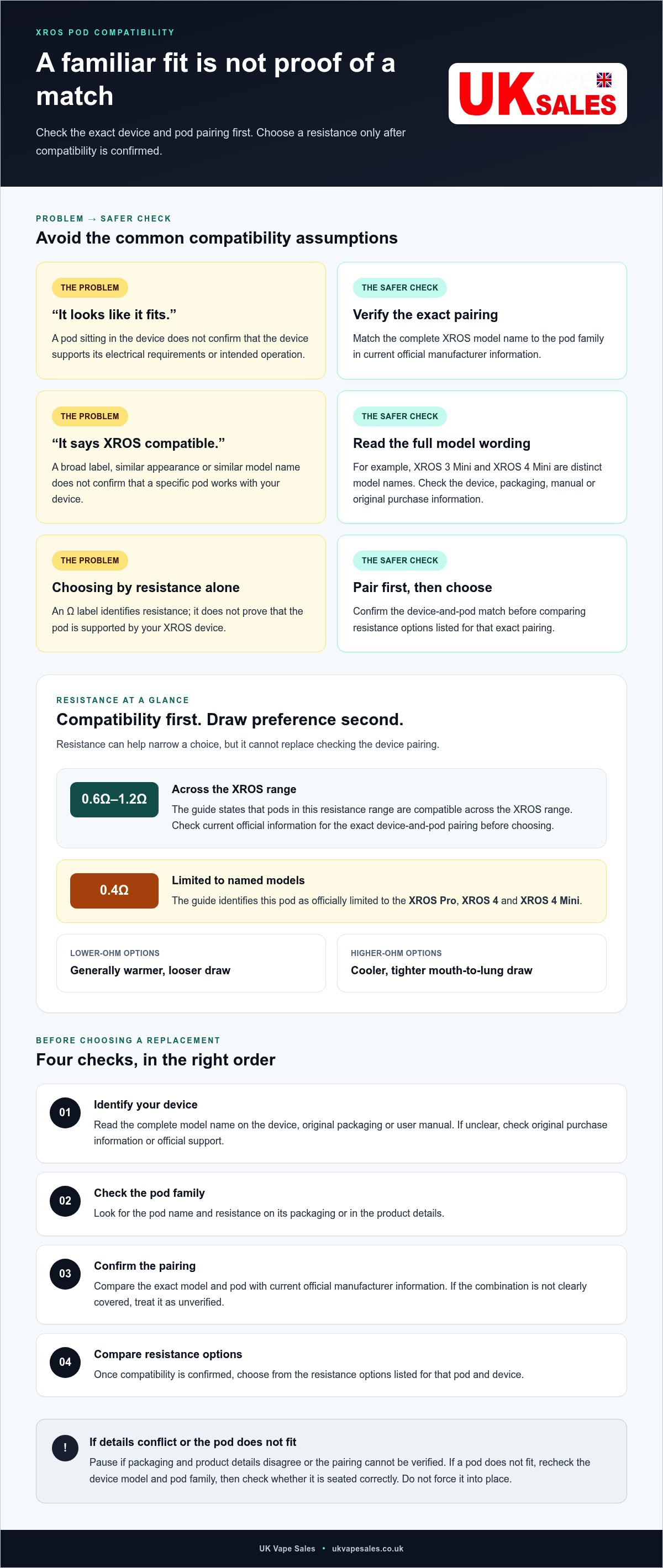
How to check an XROS replacement pod before you buy
Use this sequence before choosing a replacement. It keeps the checks in the right order:
- Identify your device: Read the complete model name on the device, packaging or manual.
- Check the pod family: Look for the pod name printed on its packaging or in the product details.
- Confirm the pairing: Compare the exact model and pod against the compatibility chart and current official information.
- Compare resistance: Once the pairing is confirmed, choose from the resistance options listed for that pod and device.
Don’t rely on a listing that says only “fits XROS”. Exact wording matters: a product marked for one model or pod family may not be verified for every device with a similar name. For broader context on differences between pod kits, see Vaporesso XROS vs OXVA XLIM: Ultimate Pod Kit Comparison.
What should you check on the device and pod packaging?
Match the full model name on your device to the pod name and resistance shown on the packaging. Then compare those details with the compatibility chart and current official model-specific information. A general XROS label or matching appearance isn’t enough. If packaging and product details conflict, or you can’t verify the pairing, pause before buying.
What if a pod does not fit or perform as expected?
Recheck the device model and pod family, then check whether the pod is seated correctly. Don’t force it into place. A mismatch is one possibility, but fit or performance alone can’t establish the cause. For a separate-brand example of how pod compatibility guidance works, see OXVA XLIM Pod Compatibility: The Ultimate UK Guide.
If you’re exploring refill pods for other systems, browse the refill pods collection. Those products are for other systems and shouldn’t be treated as confirmation of XROS compatibility.
Choose your next step after confirming XROS pod compatibility
Make the choice in this order: identify the exact device model, confirm its pod pairing in Vaporesso’s current information, then select a resistance that suits your preference. Compatibility comes before the vaping style you want from a pod.
Don’t buy based only on a similar name, matching appearance or a listing that says it fits “XROS” without specifying the model and pod. If the details don’t line up, pause and verify them rather than guessing. This XROS pods compatibility guide is a starting point, but model-specific manufacturer information should settle any uncertainty.
When should you replace a pod rather than change resistance?
Resistance is a choice between compatible pod options; it doesn’t restore a pod that’s worn or no longer working as expected. Consider the pod’s condition and how it has been used, and follow any care or replacement guidance supplied with the device. There’s no single replacement interval that can be assumed for every user and pod.
Keep the decisions separate: confirm the device match first, decide whether the pod needs replacing based on its condition, and choose resistance only after that. If you’re exploring refill pods for other systems, the refill pods collection is a general place to browse. It shouldn’t be taken as confirmation that a product is compatible with an XROS device.
Where can you continue comparing pod systems?
For wider kit context, compare the XROS range with OXVA XLIM in Vaporesso XROS vs OXVA XLIM: Ultimate Pod Kit Comparison. The comparison can help you understand differences between systems, but it doesn’t replace checking which pods fit a particular device.
If you’re considering a different refillable setup, browse relevant vape hardware information and check the pod system’s own compatibility details before choosing. Keep the same order in mind: exact device, verified pod match, then resistance or other preferences.
Make your next pod choice with confidence
The key to choosing an XROS replacement is getting the order right: identify the exact device model, confirm the pod pairing in Vaporesso’s current documentation, then choose a compatible resistance. A similar name or shape isn’t proof of a match, and resistance preference can’t establish compatibility on its own.
Use this XROS pods compatibility guide as a practical reference, then check the packaging and product details against your device before buying. If the model or pairing remains unclear, pause rather than rely on a broad or unverified listing.
UK Vape Sales provides reader-first vaping guidance, alongside a refill pods collection and other refillable vape products for people comparing pod systems. These are general options, not confirmation that XROS pods are available or compatible. If you’re exploring other refillable setups, browse refillable vape products and check each system’s own pod details.
With the model and pairing confirmed first, you can choose your next step with greater confidence.
Frequently Asked Questions
Are all Vaporesso XROS pods compatible with every XROS device?
No. Vaporesso’s compatibility information lists 0.6Ω to 1.2Ω XROS pods across the XROS range, but the 0.4Ω pod is an exception, listed for the XROS Pro, XROS 4 and XROS 4 Mini. Check the precise device model and pod pairing in current manufacturer information before buying. A pod’s similar appearance or an unqualified “XROS compatible” label isn’t proof that it suits your device.
How do I find out which Vaporesso XROS model I have?
Check the name printed on the device, original packaging or user manual. If you no longer have those, look at your original purchase details. Keep the complete model wording, such as “XROS 3 Mini” or “XROS 4 Mini”, because similar names identify different devices. If the markings are unclear, use Vaporesso’s official support information to identify the model rather than relying on appearance alone.
Can I use a newer XROS pod in an older XROS device?
Some newer pods may be compatible with older XROS models, but don’t assume every pod works across generations. The compatibility information lists 0.6Ω to 1.2Ω pods across the range, while the 0.4Ω pod is listed for the XROS Pro, XROS 4 and XROS 4 Mini. Check the exact pairing for your model. The XROS pods compatibility guide’s central advice is to verify before buying.
Does pod resistance affect XROS compatibility or just the vaping experience?
Resistance can relate to the pod’s vaping characteristics, but it doesn’t prove compatibility. First confirm that the device supports the pod family and resistance option. Then consider your preferred draw: lower-resistance options are generally associated with a warmer, looser vape, while higher-resistance options tend towards a cooler, tighter draw. Use the manufacturer’s device information to confirm which options are supported by your specific model.
What should I do if my XROS pod does not fit properly?
Don’t force the pod into the device. Remove it and check that you’ve identified the exact XROS model and selected the right pod family. Then inspect how the pod is positioned and follow the device instructions for seating it. If it still doesn’t fit, stop and recheck the manufacturer’s compatibility information. A poor fit doesn’t, by itself, establish whether the cause is a mismatch or another issue.
How can I check that an XROS replacement pod is the right one before buying?
Read the complete model name on your device, then compare it with the pod family and resistance printed on the packaging or product listing. Confirm that the exact pairing appears in current Vaporesso information. Don’t rely solely on a broad XROS label, a similar-looking pod or a listing that doesn’t name your model. If details conflict or remain unclear, hold off until you can verify the match.